A game idea becomes easier to judge when someone can play it. A description can explain the setting and a mood board can suggest the look, but neither shows whether the controls feel right, the rules make sense or a player wants another attempt.
To turn your game idea into a playable prototype, choose one question to test, build the smallest version that lets players answer it, and use their behavior to decide what happens next. For a first mobile game, that might mean one mechanic, a few short levels and a restart button.
This guide is for founders and product owners preparing their first game brief. It walks through a simple example, the scope to agree with a developer, budget and schedule factors, and the evidence to collect before approving full production. If you already have a concept or rough build, our mobile game development team can discuss the next milestone with you.
What is a playable game prototype?
A playable prototype is a small working version of a game built to test an uncertain part of the experience. A player can take actions, see the consequences and try again. The build needs enough context to make that test meaningful; it does not need every feature of the planned game.
A puzzle prototype might test how players move pieces. An action prototype might test movement and aiming. A multiplayer prototype might need two real players and a network connection because timing between people is the question. Choose the build around what you need to learn.
A prototype, a vertical slice and a first release serve different decisions. A prototype explores whether the idea works. A vertical slice demonstrates a small section at the intended production quality. A first release must support a complete, usable experience for its chosen audience. Agree what your milestone means in the proposal, because teams use these labels differently.
1. Describe what the player does, again and again
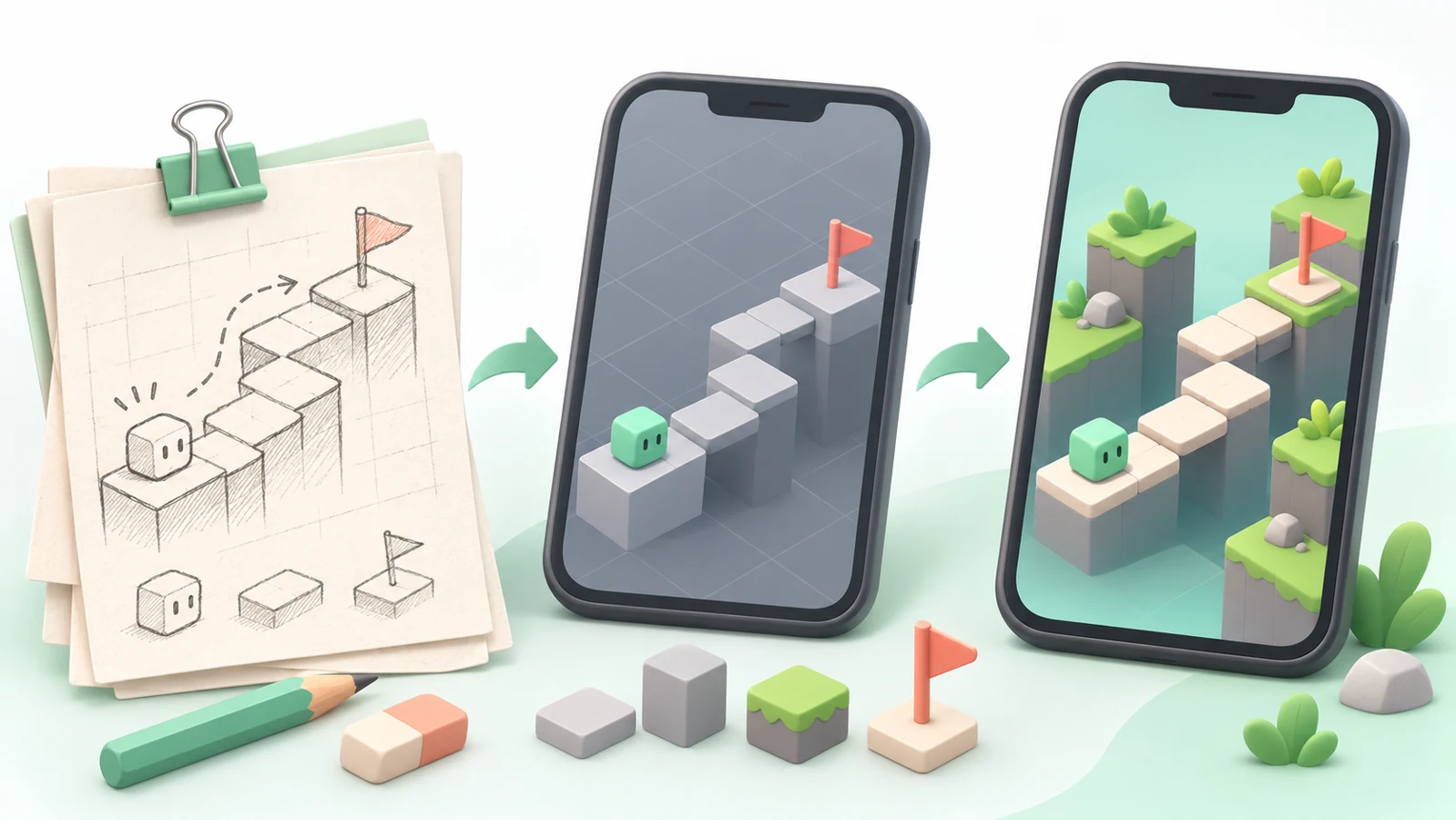
Start with the action rather than the feature list. “A cozy adventure with crafting, quests and multiplayer” leaves many decisions open. “The player moves a platform, guides a courier to the flag, then tries a harder route” gives a developer something specific to build.
Write your core loop in three parts: action → feedback → next decision. Unity’s guide to finding a core game loop offers a useful starting point for identifying the repeated activity at the center of a game.
For our example, imagine a small courier puzzle:
- Action: move a platform to connect a route.
- Feedback: the courier advances or the route fails.
- Next decision: adjust the layout and try to reach the flag.
Now choose the uncertainty: can a new player understand the platform control and solve a route without the designer explaining it? That question determines the prototype’s scope and its first playtest.
2. Choose the smallest build that answers your question
Try the rules on paper before coding when that will answer the question. Cards, a grid and movable tokens can reveal confusing rules or an obvious solution. Use a digital build when the uncertainty depends on touch controls, timing, physics, camera movement, sound or interaction between players.
For the courier puzzle, paper can help arrange the route. A phone build is needed to judge dragging, snapping and the readability of the path under a player’s finger. A desktop mouse test would leave that touch question unresolved.
| Include in this prototype | Leave for a later decision | Why |
|---|---|---|
| One platform-moving mechanic | Extra movement abilities | Keep the control test focused. |
| Three short puzzle layouts | A large level library | Try an introduction and variations without funding a content pipeline. |
| Clear start, success, failure and restart | Accounts, daily rewards and a shop | Let players complete and repeat the loop. |
| Readable placeholder shapes and basic movement feedback | A complete character and environment art package | Make the rules understandable before expanding the visual scope. |
| A build on an agreed phone | Every target device and store submission | Test the intended input while recording the device coverage still to do. |
This is a worked scope example, not a required template for every genre. If the appeal depends on atmosphere, animation or music, include enough of those elements to test it. If online cooperation is central, replacing the second player with a scripted character may hide the very problem you need to discover.
3. Prepare a one-page prototype brief
You do not need to write a complete design document before the first conversation. You do need a shared description of the job. Send each prospective developer the same brief so their proposals are easier to compare.
- Audience: who should enjoy the game, and what do they already play?
- Core loop: what action, feedback and decision repeat?
- Test question: what uncertainty should this build resolve?
- Platform: phone, browser or desktop; name the input method and reference device.
- Included scope: mechanics, levels, screens, art, sound and any online behavior.
- Exclusions: features that will be estimated separately.
- Delivery: playable build, editable project, setup notes and a record of known limitations.
- Review: who approves changes, when feedback is due and what counts as completion.
Use reference games to explain a particular control, camera or pace. Be specific about what you mean. Two references with completely different production scales are not a specification for combining every feature they contain.
4. Pick tools and visual detail that support the test
Ask the developer to explain the engine choice against your platform, existing assets, team experience and intended next step. A quick browser experiment and a prototype intended for further mobile development may call for different approaches.
Agree whether the project is exploratory or intended to become a production starting point. Reusing code can be useful, but a prototype built to change quickly may need restructuring. Have the developer identify what can carry forward and what will need replacement.
Keep visuals readable. The player should recognize what moves, what blocks the route and what success looks like. Basic color, motion and sound cues can communicate these rules without a full art package. For a game whose main attraction is its visual style, budget a representative visual test as part of the scope.
List technical risks separately: a physics interaction, network delay, a camera behavior or performance on an older phone. Test the risky part early enough that its result can change the plan.
What affects prototype cost and timeline?
The useful budget question is: what work is needed to answer this question, on this device, with these deliverables? A single mechanic using an existing project is a different job from new multiplayer networking or custom character animation.
- Design uncertainty: how much exploration and rule revision is included?
- Engineering: controls, physics, camera, AI, networking and integrations.
- Content: levels, assets, animation, audio and interface screens.
- Testing: device coverage, recruiting players, running sessions and fixing issues.
- Review and handover: feedback rounds, documentation and project setup.
Ask for a written estimate with currency, assumptions, included revisions, exclusions and payment milestones. Separate the initial build from playtest changes, licensed assets, device or account costs and any later production work. For the wider budget, use our mobile game development cost guide.
Plan the schedule around reviewable outputs: agree the brief, deliver the first playable, run the test, make the agreed changes, then hand over the findings. Include time for your own feedback and tester availability. A supplier’s promised delivery window only becomes comparable when the scope and acceptance criteria match.
5. Put the prototype in front of intended players
Recruit people who resemble the audience in your brief. Friends and colleagues can help find bugs, but their familiarity with the idea can make instructions seem clearer than they are.
Give each tester the same short introduction and let them try the game before helping. Record where they hesitate, which actions they attempt, how a session ends and whether they choose to retry. Ask permission before recording a session and keep the information you collect relevant to the test.
| What to observe | Useful question afterward | Possible next action |
|---|---|---|
| Does the player discover that platforms move? | “What did you think you could interact with?” | Improve the input cue or first layout. |
| Can they explain why a route failed? | “What happened on that attempt?” | Clarify feedback or simplify the rule. |
| Do they attempt another route without prompting? | “What would you try next?” | Explore challenge variation if the control is understood. |
| Does dragging work on the test phone? | “Was there a moment the control felt different from what you expected?” | Adjust touch targets, snapping or camera placement. |
These are planned observations, not results from a completed study. Set decision criteria before testing, then report the actual participant count, devices, build version and findings. A small test can uncover usability problems; it does not establish market demand, long-term retention or revenue.
Choose a practical way to share the build. For iOS testing, Apple’s TestFlight provides beta distribution and feedback tools. Agree account ownership, access and any review dependencies with the developer. A prototype does not have to be a public App Store release.
6. Decide whether to revise, continue or stop
Bring the playtest findings back to the question in the brief. “Players liked it” is less useful than “players understood the control, but could not explain the failure state.” The second observation points to a specific change.
- Revise: change a control, rule or feedback cue and run another focused test.
- Continue: define the next milestone around the remaining uncertainty, such as visual quality, production effort or a small release.
- Stop or change direction: record why the idea did not meet the criteria before funding more features.
Keep the decision with the evidence: build version, observations, changes and unresolved risks. A technically working prototype still needs a separate production estimate. More content, accessibility, device coverage, persistence, security, store preparation and support may all remain ahead.
What should your developer hand over?
Before accepting the milestone, open the delivered build on the agreed device and complete the loop yourself. Ask another developer to check the project setup if you cannot assess it internally.
- The playable build, version number and instructions for installing or opening it.
- The editable engine project or repository, with the version and dependencies recorded.
- Included art and audio sources, plus a list of third-party assets and their licenses.
- Known issues, test notes and the limits of device coverage.
- The agreed ownership and permitted reuse terms for code and assets.
- A proposed next milestone that separates reusable work from work still to build.
For delivery experience you can inspect, see Runner Runner. In a client-submitted Clutch review, PlaySphere Studios describes Capermint’s contribution to mobile development, UI/UX, 3D modeling, animation and backend work. That is client-reported mobile delivery evidence; it is not a prototype price or a prediction for your game’s results.
Prepare your first playable
Bring one page: the audience, core loop, test question, reference device and the features you want to leave out. Add any sketches, rules or existing code. That is enough to start a useful scoping conversation.
Our mobile game development service explains the available production scope. Share your concept and the decision you want the prototype to support, and ask for a proposal with clear deliverables and review points.
Game prototype questions
Can I start with a game idea and no technical background?
Yes. Write the audience, repeated player action and question you want to test. Sketches and examples help a developer identify a suitable first scope. Ask for a playable milestone and clear handover rather than agreeing to a full feature list immediately.
Does my prototype need finished artwork?
It needs enough visual and audio information for the test to be fair. Simple shapes can work for a control test. A game whose appeal depends on atmosphere or animation may need a representative sample of those elements.
How much does a game prototype cost?
Cost depends on the mechanics, target platform, content, technical risks, revisions and handover. Request an itemized quote for a defined test question and build. A generic prototype price cannot establish the budget for your particular game.
How long does a playable prototype take?
The schedule follows the agreed scope and review process. Ask the developer to separate the first playable, playtest, revision and handover milestones, with dependencies such as tester access and feedback dates.
Can prototype code be used in the finished game?
Sometimes. Agree whether the build is exploratory or intended to continue into production. Have the developer document reusable parts, technical shortcuts and the restructuring needed before a release.
Will a successful prototype guarantee funding or a successful launch?
No. A prototype gives evidence about the questions it actually tests. Funding, demand, long-term player behavior and commercial results require their own assessment.