
Make expression visual
Connect typed words with clearly presented sign animations.
Search the native WordPress menu, then use the complete directory for every long-tail capability.
CAPERMINT / ACCESSIBLE COMMUNICATION
Make everyday words visible.
A sign-language app experience that connects typed words and everyday phrases with character animation, helping make communication more accessible.
The current Google Play listing describes an evolved learning experience. The case study below documents Capermint’s original communication-focused project.
THE PROJECT
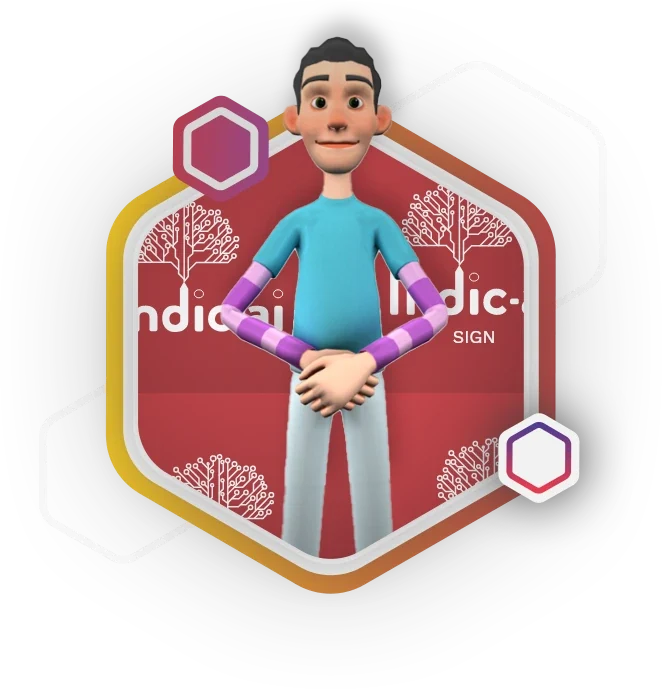
IndicAI Sign was designed around a practical communication gap: people who do not know sign language may struggle to exchange everyday information with a Deaf or hard-of-hearing person. The original app concept lets a user type text and see corresponding sign animations through a character.
Capermint’s published case describes a library of more than a thousand word animations, a letter-by-letter fallback for words outside that library, categorized common phrases and a history of previously entered words. Two characters, Bunty and Bubly, and background choices personalize the original experience.
The product has since evolved. Its current Google Play description emphasizes guided word-learning activities, pictographic lessons and animation controls. This page keeps that current listing separate from the original project scope and visuals.
Connect typed words with clearly presented sign animations.
Provide a fallback for words that are not present in the original animation library.
Use common phrases and history to make frequently needed expressions easier to revisit.
PRODUCT VISUALS
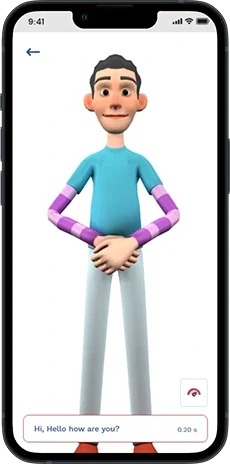
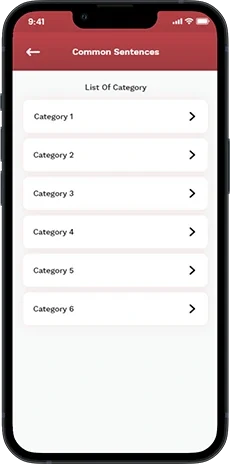
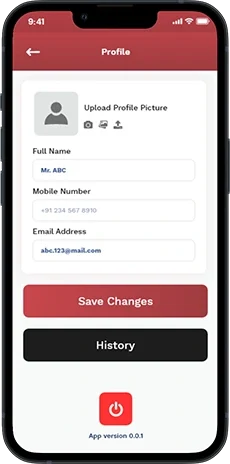
Original IndicAI interface mockups from Capermint’s case study. The currently published app may have a different interface and feature set.
THE EXPERIENCE
The original design offers both direct text entry and reusable phrases, with an animation-led result.
Type a word or select a phrase from the common-sentence categories.
The original scope maps supported words to a stored animation library.
Words outside the dictionary use the letter-by-letter fallback described in the case study.
History and common phrases help users revisit language they have already used.
CHALLENGES & SOLUTIONS
Capermint’s original case study identifies animation coverage as its main challenge and describes matching and fallback behavior in its testing account.
THE CHALLENGE
Creating a dedicated animation for every possible word was not practical for the initial library.
THE RESPONSE
The original app uses alphabet-by-alphabet signing when a word does not have its own animation.
Why it mattersThe experience has a defined fallback rather than simply stopping at an unknown word.
THE CHALLENGE
Typing a familiar sentence each time can slow a simple interaction.
THE RESPONSE
Categorized common sentences provide a selection-based route to frequently used phrases.
Why it mattersThe user can reach a familiar expression with less repeated input.
THE CHALLENGE
The signing character must remain the central visual element of the output.
THE RESPONSE
The original screen gives the character a large, uncluttered area above the text-entry control.
Why it mattersThe layout directs attention toward the animated expression.
THE CHALLENGE
A text-to-animation experience depends on selecting the appropriate stored animation and handling missing entries consistently.
THE RESPONSE
Capermint describes testing word matching and the letter-by-letter fallback, alongside UI/UX checks.
Why it mattersThe documented validation addresses the two main output paths of the original app.
PRODUCT FEATURES
Users enter text to access the original sign-animation experience.
The published case describes a library of more than a thousand word animations.
The original scope handles out-of-dictionary words letter by letter.
Categorized sentences offer a shortcut to frequently used expressions.
Bunty and Bubly, together with background options, personalize the original interface.
The original app includes saved word history and editable profile information.
PRODUCT APPROACH
The original case documents both the animation-coverage response and the behaviors checked during testing.
Create and organize the word animations described in the original scope.
Use letter-by-letter output for words that are not in the stored dictionary.
Add common phrases and history around the central text-to-animation flow.
Test matching words, missing dictionary entries and the interface experience, as described in the source.
DESIGN & USABILITY
The original interface uses a restrained red-and-white palette and gives the character room to communicate.
The character takes visual priority over surrounding controls.
Category rows provide a familiar way to browse common expressions.
Text entry, profile and history support the main experience without competing with the character.
OUTCOMES & IMPACT
The original project connects a vocabulary library to a usable mobile interface, with alternatives for common phrases and unfamiliar words.
Typed input can lead to a visible character animation.
A fingerspelling fallback addresses gaps in the original word library.
Common phrases and history support recurring everyday interactions.
The original scope and current store description represent different stages of the product. No independent translation-accuracy, accessibility or communication-outcome study was supplied.
PROJECT QUESTIONS
A communication-focused app that presented sign animations for typed words and common phrases, with customizable characters and a word history.
Capermint’s source describes a letter-by-letter animation fallback, commonly referred to as fingerspelling.
The original presentation names Bunty and Bubly as the selectable characters.
No such claim is made. The current Google Play description emphasizes a guided learning experience; the gallery documents the original Capermint project.
This case study presents an assistive product concept. The source does not establish interpreter-equivalent accuracy or validated performance for every communication context.
LET’S BUILD YOUR NEXT EXPERIENCE.